Locus
Link to open source: https://github.com/nandinigoyaldev/locus
Echo – Desktop Knowledge‑Workspace App
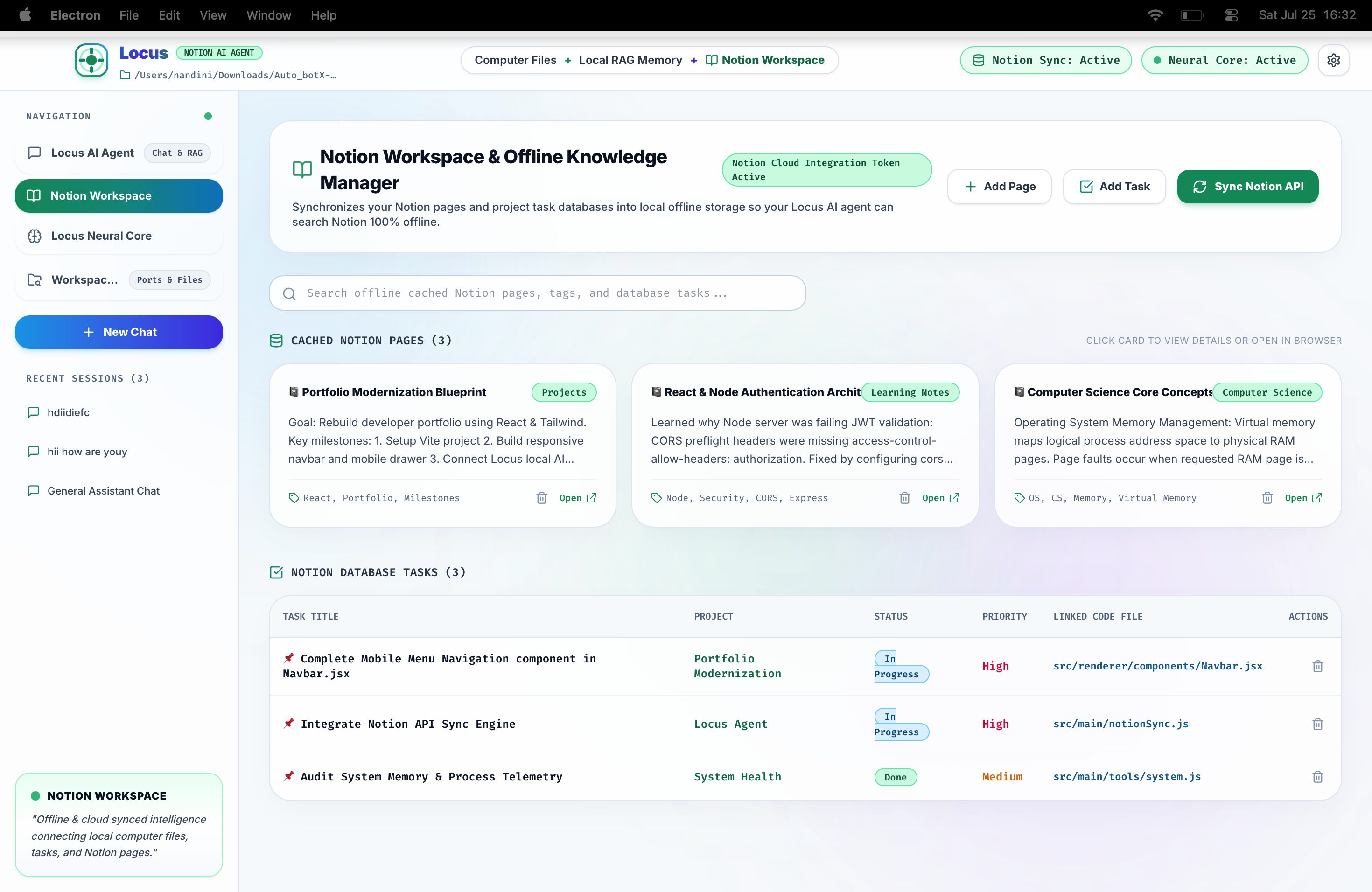
An Electron‑based, premium‑looking desktop application that brings your Notion workspace, AI chat, system tools, and file‑watching together in one seamless UI.
📖 Overview
Echo is a cross‑platform Electron app designed for knowledge workers who want a unified, offline‑friendly hub for:
- Notion – sync, browse, edit, and search your pages, tasks, and notes.
- AI chat – multi‑session conversations powered by Ollama (local LLMs).
- System utilities – quick access to system info, process list, Git status, and a terminal executor.
- Observer mode – monitor a folder and view a timeline of file‑system changes.
- Memory & audit logs – lightweight storage for personal “memories” and a read‑only audit trail.
All features are exposed through a clean, dark‑mode UI with modern glass‑morphism styling, smooth micro‑animations, and the Inter font.
🎯 Goal (MVP)
| Area | Core Feature |
|---|---|
| Notion | Full workspace sync; CRUD for pages, tasks, notes; search. |
| Chat | Multi‑session Ollama chat; create/switch/delete sessions; run agent loop. |
| Model Management | View status, pull new models, set primary model. |
| System Tools | System info, process list, Git status, terminal command execution. |
| Observer | Start/stop folder observation and retrieve a change timeline. |
| Memory & Audit | Save/get/delete/clear memories; view audit logs. |
| Settings | Persistent settings + folder‑selection dialog. |
| UX | Dark‑mode UI, gradient/glass cards, subtle hover animations, responsive layout. |
| Packaging | npm run dev for development; build script for installers. |
🏗️ Architecture
src/
├─ main/ # Electron main process (IPC handlers, window creation)
│ ├─ main.js # Core process, registers all IPC channels
│ ├─ db.js # SQLite / low‑db layer for persisting data
│ ├─ agent.js # AI‑agent orchestration
│ ├─ observer.js # File‑system watcher
│ ├─ tools/ # Helper modules (ollamaEngine, notionTools, etc.)
│ └─ preload.js # Exposes a safe API to the renderer
│
├─ renderer/ # Front‑end (HTML/JS/CSS)
│ ├─ index.html
│ ├─ assets/ # Images, icons, fonts
│ └─ styles/ # CSS with design tokens (colors, gradients)
│
└─ package.json # Scripts, dependencies, build config
- IPC – All UI actions go through
ipcMain.handleinmain.js. - Database – Simple local store (SQLite or lowdb) for chats, memories, settings, audit logs.
- Ollama – Run locally; the
ollamaEnginemodule wraps its REST API. - Notion – Uses official Notion SDK to sync workspace and perform CRUD.
🛠️ Tech Stack
| Layer | Technology |
|---|---|
| Desktop runtime | Electron (v28) |
| UI | Vanilla HTML + CSS (custom design system) + JavaScript (ES2022) |
| Styling | CSS variables, gradient backgrounds, glass‑morphism, Inter font from Google Fonts |
| Database | SQLite (via better-sqlite3) or lowdb (JSON) |
| AI | Ollama (local LLM) – HTTP API |
| Notion | Official Notion JavaScript SDK |
| Build | Vite (dev server) + electron-builder for packaging |
| Package manager | npm (scripts: npm run dev, npm run package) |
🚀 Getting Started
bash
# Clone the repo
git clone https://github.com/nandinigoyaldev/Echo.git
cd Echo
# Install dependencies
npm install
# Run the development server (Vite + Electron)
npm run dev # opens the app and watches for changes
Configure environment variables (e.g., NOTION_TOKEN, OLLAMA_HOST) in a .env file at the project root.
📂 Key Files
| File | Role |
|---|---|
src/main/main.js |
Electron entry point; registers all IPC handlers (Notion, chat, tools, observer, etc.). |
src/main/db.js |
Persistence layer for chats, memories, settings, audit logs. |
src/main/tools/ollamaEngine.js |
Wraps Ollama HTTP API (status, pull model, set primary). |
src/main/tools/notionTools.js |
CRUD helpers for Notion pages, tasks, notes. |
src/renderer/index.html |
UI skeleton; loads bundled JS/CSS. |
src/renderer/styles/index.css |
Design system (colors, gradients, typography). |
📦 Packaging
bash
npm run package # creates macOS .dmg (or .exe/.AppImage for other OSes)
The resulting installer includes the bundled Vite build and the Electron runtime.
This build was uploaded as a hackathon project


