AI Exam Generator -Sarwan Upadhyay
Link to open source: https://github.com/sarwanupadhyay/AI-Powered-Exam-generator.git
Link to Live Project: https://exam-generator-frontend.vercel.app/
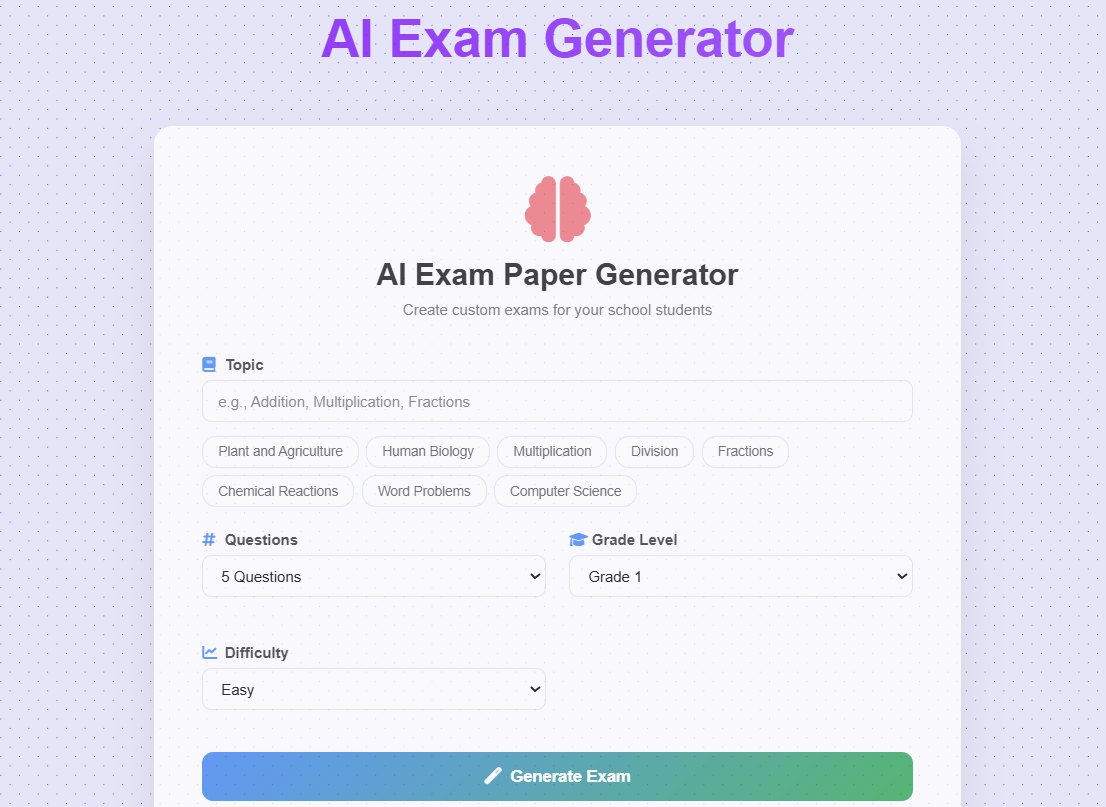
A full-stack web application that allows school teachers to generate custom exams using AI. Built with React (frontend) and Node.js/Express (backend), integrated with Google's Gemini AI.
- AI-Powered Question Generation: Uses Google Gemini AI to create questions
- Customizable Parameters: Choose the number of questions (1-30) and the grade level of students
- Professional Exam Layout: Clean, printable exam format with student information fields
- Export Options: Print directly or download as a text file and Excel format
- Responsive Design: Works on desktop, tablet, and mobile devices
- Loading States: Visual feedback during AI processing
- Error Handling: User-friendly error messages with retry options
- React - UI framework
- Axios - HTTP client
- CSS3 - Styling with modern features (backdrop-filter, gradients)
- Font Awesome - Icons
- Node.js - Runtime environment
- Express - Web framework
- Axios - HTTP client for API calls
- CORS - Cross-origin resource sharing
- dotenv - Environment variable management
- Google Gemini API - AI model for question generation
ai-exam-generator/
├── backend/
│   ├── server.js              # Main server file
│   ├── package.json           # Backend dependencies
│   └── .env                   # Environment variables
└── frontend/
    ├── public/
    │   └── index.html          # HTML template
    ├── src/
    │   ├── components/
    │   │   ├── ExamGenerator.js    # Main exam generation form
    │   │   ├── ExamGenerator.css
    │   │   ├── ExamDisplay.js      # Generated exam display
    │   │   ├── ExamDisplay.css
    │   │   ├── LoadingSpinner.js   # Loading animation
    │   │   ├── LoadingSpinner.css
    │   │   ├── ErrorMessage.js     # Error handling component
    │   │   └── ErrorMessage.css77777777
    │   ├── App.js              # Main application component
    │   ├── App.css
    │   ├── index.js            # React entry point
    │   └── index.css           # Global styles
    └── package.json            # Frontend dependencies
- Node.js (v14 or higher)
- npm or yarn
- Google Gemini API Key (free from Google AI Studio)
-
Clone or create the project structure as shown above
-
Get your Gemini API Key:
- Visit Google AI Studio
- Click "Get API key"
- Copy your API key
-
Setup Backend:
cd backend
npm install
Create
.envfile:GEMINI_API_KEY=your_api_key_here PORT=5000
-
Setup Frontend:
cd frontend
npm install
-
Start the Backend Server:
cd backend
npm run dev    # or npm start
Server will run on http://localhost:5000
-
Start the Frontend (in a new terminal):
cd frontend
npm start
Frontend will run on http://localhost:3000
-
Open your browser and go to http://localhost:3000
- Select a Math Topic: Choose from predefined topics or enter a custom one
- Choose Number of Questions: Select between 1-20 questions
- Generate Exam: Click the "Generate Math Exam" button
- View Results: Review the generated exam questions
- Print or Download: Use the action buttons to print directly or download as text
GET /health- Health check endpointPOST /generate-exam- Generate exam questions
Request Body:
{
  "topic": "Addition",
  "questionCount": 5
}
Response:
{
  "topic": "Addition",
  "questionCount": 5,
  "questions": [
    {
      "id": 1,
      "question": "What is 5 + 3?"
    },
    // ... more questions
  ],
  "generatedAt": "2024-01-15T10:30:00.000Z"
}
- Modern Glass Morphism UI: Translucent cards with backdrop blur
- Gradient Backgrounds: Eye-catching color schemes
- Responsive Design: Mobile-first approach
- Print-Friendly Layout: Professional exam format for printing
- Loading Animations: Engaging user feedback during processing
- Icon Integration: Font Awesome icons throughout
- API Key Protection: Gemini API key stored securely on the backend
- Input Validation: Frontend and backend validation
- Error Handling: Graceful error management
- CORS Configuration: Proper cross-origin setup
The application is fully responsive and works on:
- Desktop (1200px+)
- Tablet (768px - 1199px)
- Mobile (320px - 767px)
This project was created as a full-stack development assessment. Feel free to:
- Report bugs
- Suggest improvements
- Add new features
- Improve documentation
This project is created for educational and assessment purposes.
- Google AI Studio for providing the Gemini API
- React Team for the amazing frontend framework
- Express.js for the lightweight backend framework
- Font Awesome for the beautiful icons
If you encounter any issues:
- Check that your Gemini API key is correctly set
- Ensure both frontend and backend servers are running
- Verify your internet connection
- Check the browser console for any errors

