Codexa – Manage Multiple Codex Accounts in VS Code

Link to open source: https://github.com/coderbaba0/Codexa
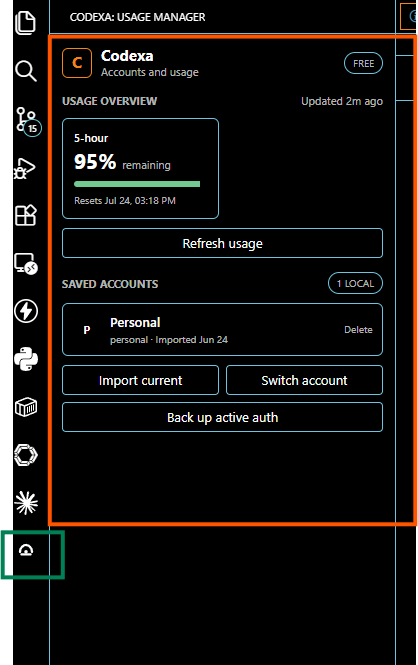
Codexa is a local VS Code extension built to help developers manage multiple Codex accounts from one machine.
It allows users to save the active Codex login as a named local profile, switch between saved accounts, create authentication backups, refresh expired tokens, and monitor available usage limits directly inside VS Code.
Codexa shows 5-hour, weekly, and code-review usage windows in the Activity Bar and status bar, so users can check their remaining usage without leaving the editor.
The extension is useful for developers who work with personal, work, or testing Codex accounts and want a simple local way to switch accounts without manually editing authentication files.
Key features : include account profiles, fast switching, usage dashboard, token refresh, status bar usage display, local backups, profile removal, and automatic usage refresh.
Codexa stores all account data locally on the user’s machine under ~/.codex and ~/.codex-usage-manager. Authentication files contain sensitive credentials and should not be committed, uploaded, or shared.
This is an independent community project and is not an official OpenAI product.

