
Scrape the Data from Horoscope.com
If you open Horoscope.com and choose your zodiac sign, the horoscope data for your zodiac sign for today will be shown.
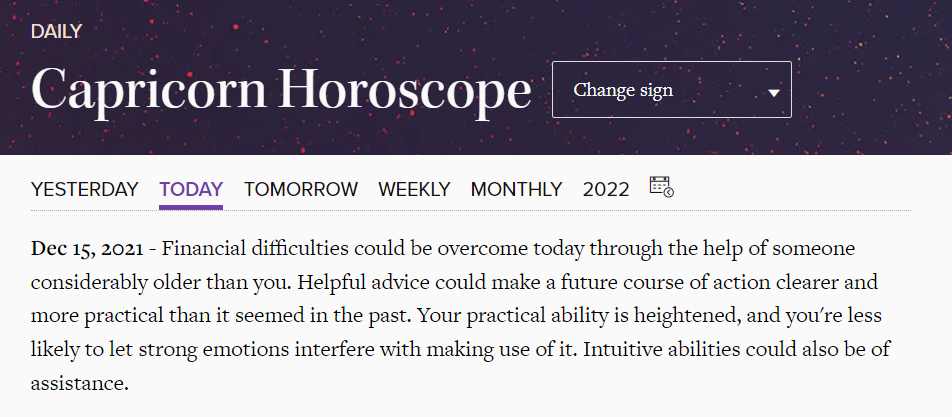
In the above image, you can see you can view the horoscope for yesterday, tomorrow, weekly, monthly or even a custom date. We're going to use all of these.
But first if you see the URL of the current page, it is something like: https://www.horoscope.com/us/horoscopes/general/horoscope-general-daily-today.aspx?sign=10 .
The URL has two variables, if you see clearly, sign and today. The value of variable sign will be assigned according to the zodiac sign. The variable today can be replaced with yesterday and tomorrow.
The dictionary below can help us with the zodiac signs:
ZODIAC_SIGNS = {
    "Aries": 1,
    "Taurus": 2,
    "Gemini": 3,
    "Cancer": 4,
    "Leo": 5,
    "Virgo": 6,
    "Libra": 7,
    "Scorpio": 8,
    "Sagittarius": 9,
    "Capricorn": 10,
    "Aquarius": 11,
    "Pisces": 12
}
This means that if your zodiac sign is Capricorn, the value of sign in the URL will be 10.
Next, if we wish to get the horoscope data for a custom date, the URL https://www.horoscope.com/us/horoscopes/general/horoscope-archive.aspx?sign=10&laDate=20211213 will help us.
It has the same sign variable, but it has another variable laDate which takes the date in YYYYMMDD format.
Now, we're ready to create different functions to fetch horoscope data. Create a utils.py file and follow along.
How to Get a Horoscope for the Day
import requests
from bs4 import BeautifulSoup


def get_horoscope_by_day(zodiac_sign: int, day: str):
    if not "-" in day:
        res = requests.get(f"https://www.horoscope.com/us/horoscopes/general/horoscope-general-daily-{day}.aspx?sign={zodiac_sign}")
    else:
        day = day.replace("-", "")
        res = requests.get(f"https://www.horoscope.com/us/horoscopes/general/horoscope-archive.aspx?sign={zodiac_sign}&laDate={day}")
    soup = BeautifulSoup(res.content, 'html.parser')
    data = soup.find('div', attrs={'class': 'main-horoscope'})
    return data.p.text
We have created our first function which accepts two arguments – an integer zodiac_sign and a string day. The day can either be today, tomorrow, yesterday or any custom date before today in the format YYYY-MM-DD.
If the day is not a custom date, it won't have the hyphen(-) symbol in it. So, we have put a condition for the same.
If there is no hyphen symbol, we make a GET request on https://www.horoscope.com/us/horoscopes/general/horoscope-general-daily-{day}.aspx?sign={zodiac_sign}. Else first, we change the date from YYYY-MM-DD to YYYYMMDD format.
Then we make a GET request on https://www.horoscope.com/us/horoscopes/general/horoscope-archive.aspx?sign={zodiac_sign}&laDate={day}.
After that, we pull the HTML data from the response content of the page using BeautifulSoup. Now we need to get the horoscope text from this HTML code. If you inspect the code of any of the webpage, you'll find this:
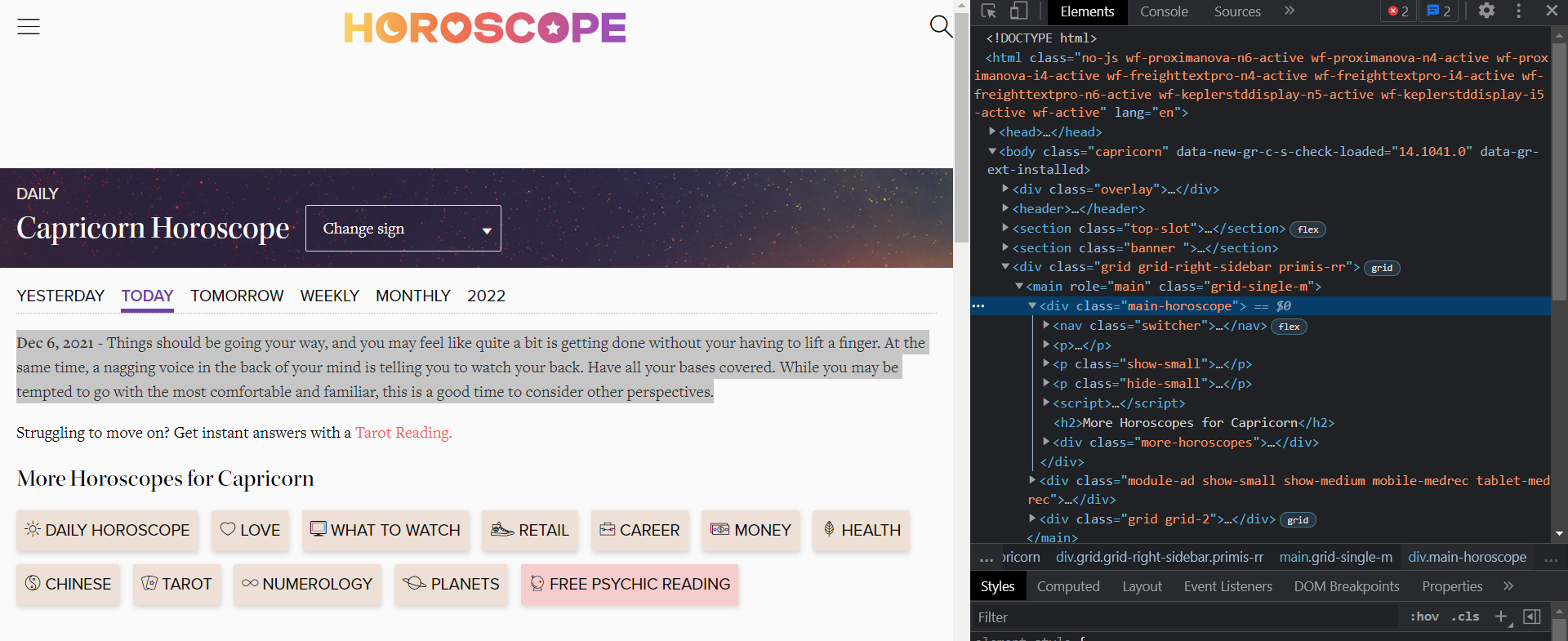
The horoscope text is contained in a div with the class main-horoscope. Thus we use the soup.find() function to extract the paragraph text string and return it.
How to Get a Horoscope for the Week
def get_horoscope_by_week(zodiac_sign: int):
    res = requests.get(f"https://www.horoscope.com/us/horoscopes/general/horoscope-general-weekly.aspx?sign={zodiac_sign}")
    soup = BeautifulSoup(res.content, 'html.parser')
    data = soup.find('div', attrs={'class': 'main-horoscope'})
    return data.p.text
The above function is quite similar to the previous one. We have just changed the URL to https://www.horoscope.com/us/horoscopes/general/horoscope-general-weekly.aspx?sign={zodiac_sign}.
How to Get a Horoscope for the Month
def get_horoscope_by_month(zodiac_sign: int):
    res = requests.get(f"https://www.horoscope.com/us/horoscopes/general/horoscope-general-monthly.aspx?sign={zodiac_sign}")
    soup = BeautifulSoup(res.content, 'html.parser')
    data = soup.find('div', attrs={'class': 'main-horoscope'})
    return data.p.text
This function is also similar to the other two except the URL which has now been changed to https://www.horoscope.com/us/horoscopes/general/horoscope-general-monthly.aspx?sign={zodiac_sign}.
5